shape shape shape

Voice Command Camera for iPhone & Android

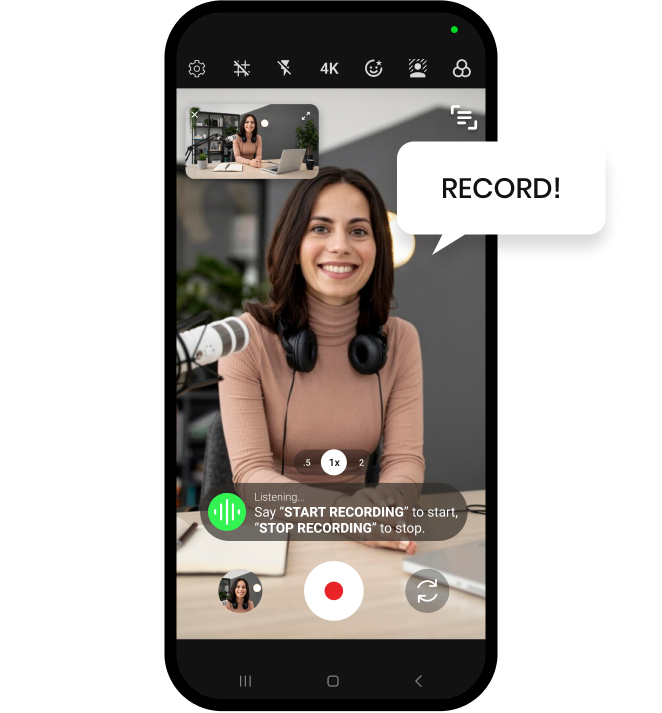
Shootsolo is a voice command camera app for iPhone and Android that runs your entire shoot with spoken commands. Say "start recording" to begin, "stop recording" to finish, then "yes" to keep or "no" to reshoot — no touch needed.


  • Download for iPhone
  • Download for Android
Shootsolo app preview dots

What is a voice command camera?

A voice command camera is a camera app that responds to spoken instructions instead of taps and button presses. Shootsolo is purpose-built for solo creators who need to direct their own shoots without walking off camera or fumbling with their phone.

How Shootsolo works

voice start

1. Say "start recording"

Shootsolo begins the take instantly — no taps, no countdown.

film take

2. Say "stop recording"

Shootsolo stops the take and asks "Save take?"

save or reshoot

3. Say "yes" or "no"

Say "yes" to keep the take or "no" to reshoot — hands-free.

Why creators choose Shootsolo

  • Simple command set that just works
  • Beats timer tricks, and no remote is required — Bluetooth shutter remotes still work if you want one
  • Commands for the whole shoot: start, stop, pause, resume, play video, close video
  • Start and stop keywords you can switch to other presets in the settings
  • Free and unlimited, and it works 100% offline
  • Keeps your hands and eyes on your craft
  • Gallery only fills with takes you approved
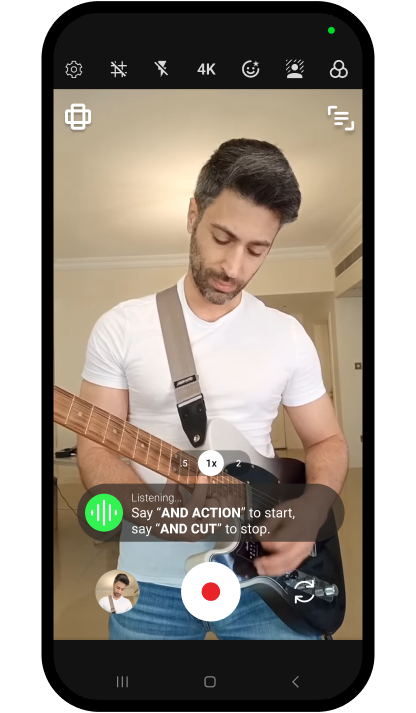
Shootsolo listening for the preset voice keywords And Action and And Cut while a guitarist films himself

Better than "Hey Siri, take a video"

If you've tried using "Hey Siri" or "Hey Google" to start recording, you already know the native OS voice commands are clunky and unreliable. Shootsolo is built from the ground up as a voice command camera, so recording, reviewing, and take management all happen through one smooth spoken interface. Say "play video" to watch a take in the built-in player, then "close video" to get back to filming. One spoken take can even be saved in portrait and landscape at the same time — something no assistant shortcut will do for you.


Download for iPhone   Download for Android

Frequently Asked Questions

What voice commands does Shootsolo support?

Shootsolo understands six recording commands: "start recording", "stop recording", "pause recording", "resume recording", "play video" and "close video". When a take ends, the app asks "Save take?" — answer "yes" to keep it or "no" to reshoot.

Can I change the voice command keywords?

Yes. In the settings you can switch the "start recording" and "stop recording" keywords to other preset keywords, such as "and action" and "and cut", so you can pick the phrases that feel most natural to you.

Is the voice command camera free?

Yes. Every voice command is included at no cost — Shootsolo is free with unlimited recording, no ads, no watermark and no subscription.

Can I use Shootsolo instead of "Hey Siri, take a video"?

You need to open Shootsolo first — you can use Siri to launch the app, then talk to Shootsolo directly. Once open, it's faster and more reliable than Siri or Google Assistant for camera control.

Does the voice command camera require headphones or a mic?

No — Shootsolo uses your phone's built-in microphone, so no extra gear is required. You can also use an external mic if you choose to.

Can I run voice commands during the recording?

Yes. While recording you can say "pause recording" and "resume recording" to hold and continue the take, and "stop recording" at any point to end it.

Is the voice command camera accurate in noisy environments?

It depends on how noisy the environment is and how well your device's microphone handles speech recognition. In most typical filming environments Shootsolo works reliably, but extremely loud settings may affect accuracy.

Download Shootsolo — Free

Available on iPhone and Android.


Download for iPhone   Download for Android